 Adrit Suite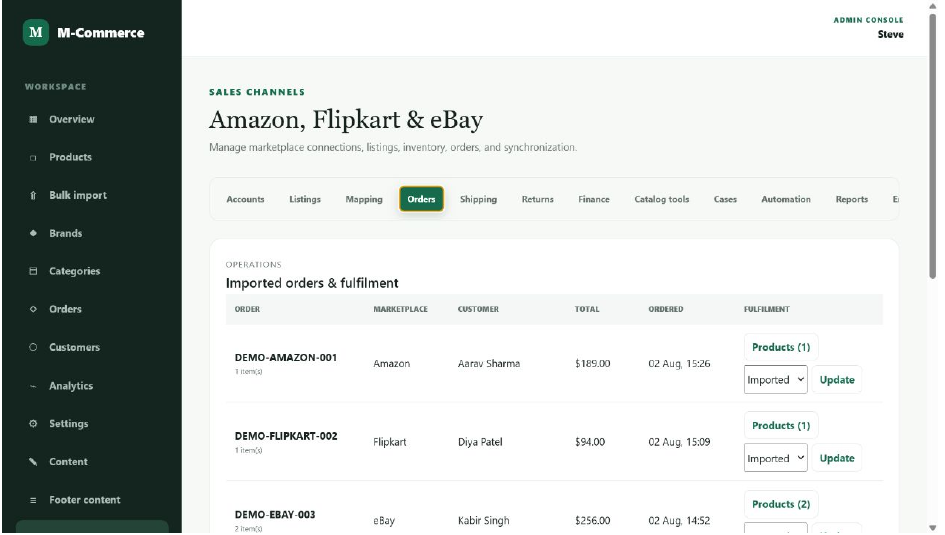
Why fragmented commerce operations create problems
When storefront orders, warehouse stock and supplier information live in separate systems, teams spend time reconciling data instead of serving customers. Stock can appear available after it has already been committed, fulfilment updates arrive late, and managers cannot see the full operating picture.
The solution is not simply another dashboard. The underlying workflow must define which system owns each record, how events move between channels and what staff should do when something fails.
Build one operational source of truth
1. Standardise the product catalogue
Give every sellable item a unique identifier and consistent attributes. Variants, bundles, categories, supplier references and pricing rules should follow the same structure across channels.
2. Separate physical stock from available stock
Available-to-sell inventory should account for reservations, pending orders, damaged items and safety stock. This prevents the system from promising units that operations cannot fulfil.
3. Use a clear order lifecycle
Define statuses such as received, confirmed, allocated, packed, shipped, delivered, cancelled and returned. Each status needs an owner, a trigger and an expected next action.
4. Connect returns to inventory and finance
A returned item is not automatically sellable. Inspection, refund status and stock disposition must be recorded before inventory is updated.
Dashboard information that supports decisions
A useful marketplace dashboard should answer operational questions quickly: Which orders are delayed? Which products are low in stock? Which returns still need action? Which supplier or warehouse is creating bottlenecks? Revenue totals alone do not provide this clarity.
- Product and supplier management with consistent records
- Real-time inventory visibility across warehouses
- Order, shipment and delivery status tracking
- Returns, refunds and exchange workflows
- Operational reports for stock, sales and fulfilment
How to introduce the system safely
- Document the current workflow and identify repeated manual work.
- Clean product, customer and inventory data before migration.
- Connect one sales channel and one fulfilment location first.
- Test cancellations, failed payments, partial fulfilment and returns.
- Train staff around roles and exceptions, not only button clicks.
- Expand in stages while monitoring fulfilment accuracy and processing time.
Is a marketplace operations platform right for you?
It is especially useful when a business manages many products, suppliers or warehouses; sells through multiple channels; or has outgrown manual reconciliation. Review the Adrit Marketplace Operations product to see the dashboard, capabilities and implementation approach.